For solo designers
Every job, run from your phone
Log the visit, update your client and keep your fees in order, on your own. Your client just opens a link.
- Free plan
- 7 days of everything
- No card to start
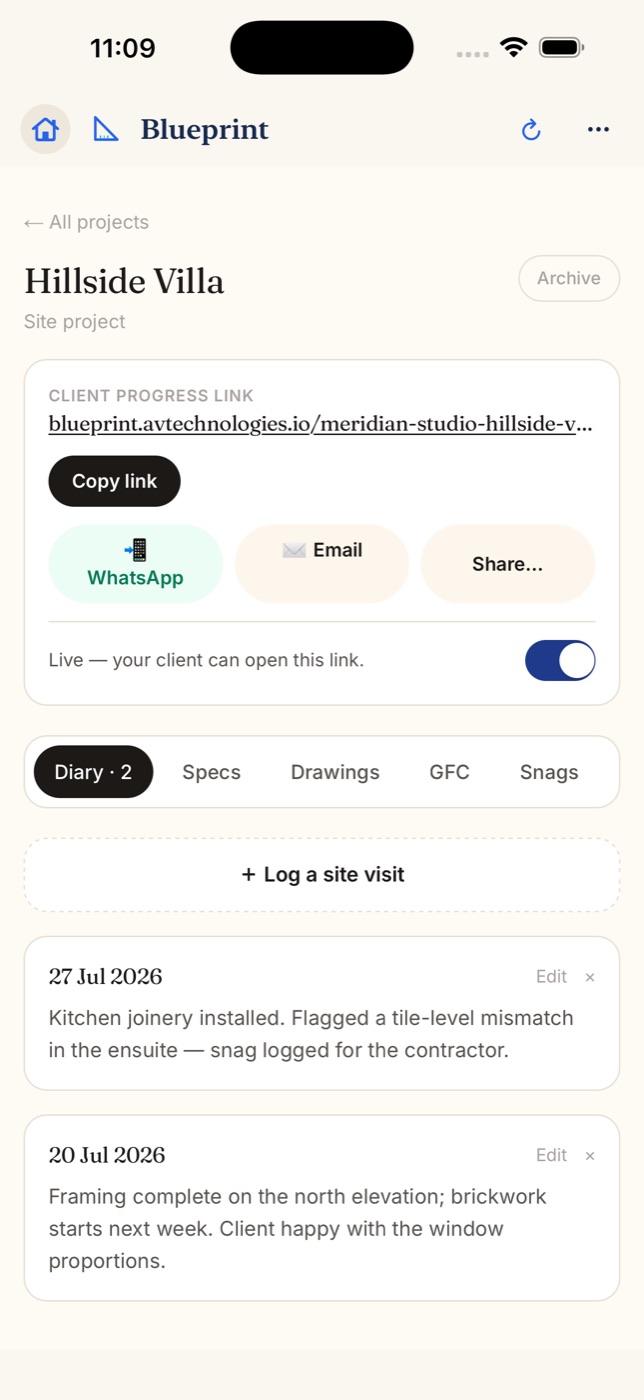
Your day with Blueprint
One designer, every job
Start on Overview
What is waiting on your clients and on you, oldest first.
Log the visit
Photos and a note from site, stamped Verified on site.
Share one link
Your client follows progress and approves there. No app, no login.
Send it, get paid
A visit report or fee statement as a PDF, and a WhatsApp reminder when a balance is outstanding.
What solo designers use most
The four that do most
Site diary
One visit per trip. Photos and a note.
Client link
Progress and approvals on one page.
Fees and payments
Fee stages, receipts and reminders.
PDF reports
Reports and statements, from your phone.
FAQ
Questions from solo designers
Is there a plan for just me?
Yes. Free, Solo and Pro are for one person, with no teammates to pay for. Plans are priced per studio, and the pricing page shows them in your currency.
Can I try everything before I pay?
Yes. A new studio gets 7 days of the full Firm plan, with no card. Then Free continues with no time limit, for one active project with the full site diary.
Can I add someone later?
Yes. Move to Studio or Firm and invite a teammate by email, as a Team member or an Intern. Your projects stay as they are.
Start with your next site visit
Free to try. Your client never installs anything.
More for solo designers
Run projects from your phone as a solo designer
When you are the whole studio, time spent on updates is time away from design. Blueprint keeps each job on your phone: the site visit, the client update, the approval and the fee, in one app. It works on iPhone, iPad, Android and the web, with one account.
- Log a visit on every trip with photos and a note. Pin the site once and visits there are stamped Verified on site.
- On the Studio plan and up, speak the note instead of typing, and get a site report written for you from your photos and voice notes. You read it before you save.
- Overview shows what is waiting on clients and on you, oldest first, so you know where to go next.
- More on the site diary.
One link for every client update
Turn on the client link and share it by WhatsApp or email. Your client opens it in any browser and sees the stage plan, site visits, drawings, finishes and extra work, and approves or asks for a change right there. You choose which visits and snags they see.
The client link starts on the Pro plan. With your studio's WhatsApp number in Settings, the page can also show a Message button that opens a chat with you. More on the client link.
Fees and paperwork, from your phone
- Split your fee into stages, record each payment and share a receipt.
- When a balance is outstanding, Remind on WhatsApp opens a polite reminder to your client. You just press send.
- Share a site visit report, project report or fee statement as a PDF.
- Fees start on the Solo plan, and stay private unless you choose to show them on the client link.
Getting started on your own
- Add your first project with the client and the address, and pin the site once.
- Pick a starting point for the stage plan: House, Apartment, Shop or office fit-out, or a blank start.
- Log a visit on your next trip, then turn on the client link and share it by WhatsApp or email.
Step-by-step help for every screen is in the help center.
Plans for one designer
Free, Solo and Pro include just you. A new studio gets 7 days of the full Firm plan with no card, then Free continues with no time limit. When you take someone on, Studio or Firm add teammates. Prices are on the pricing page, in your currency.